Quick Copy, from your keyboard.
A compact picker for fast recall. Search, use the arrow keys, and press Return to copy. Escape takes you back.
One shortcut. Right where you left off. CoPaRe
The private clipboard manager for Mac
Find what you copied. Save what you reuse. Let the rest go when you quit.
macOS 26.2 or later Apple silicon & Intel
Back to what you were doing
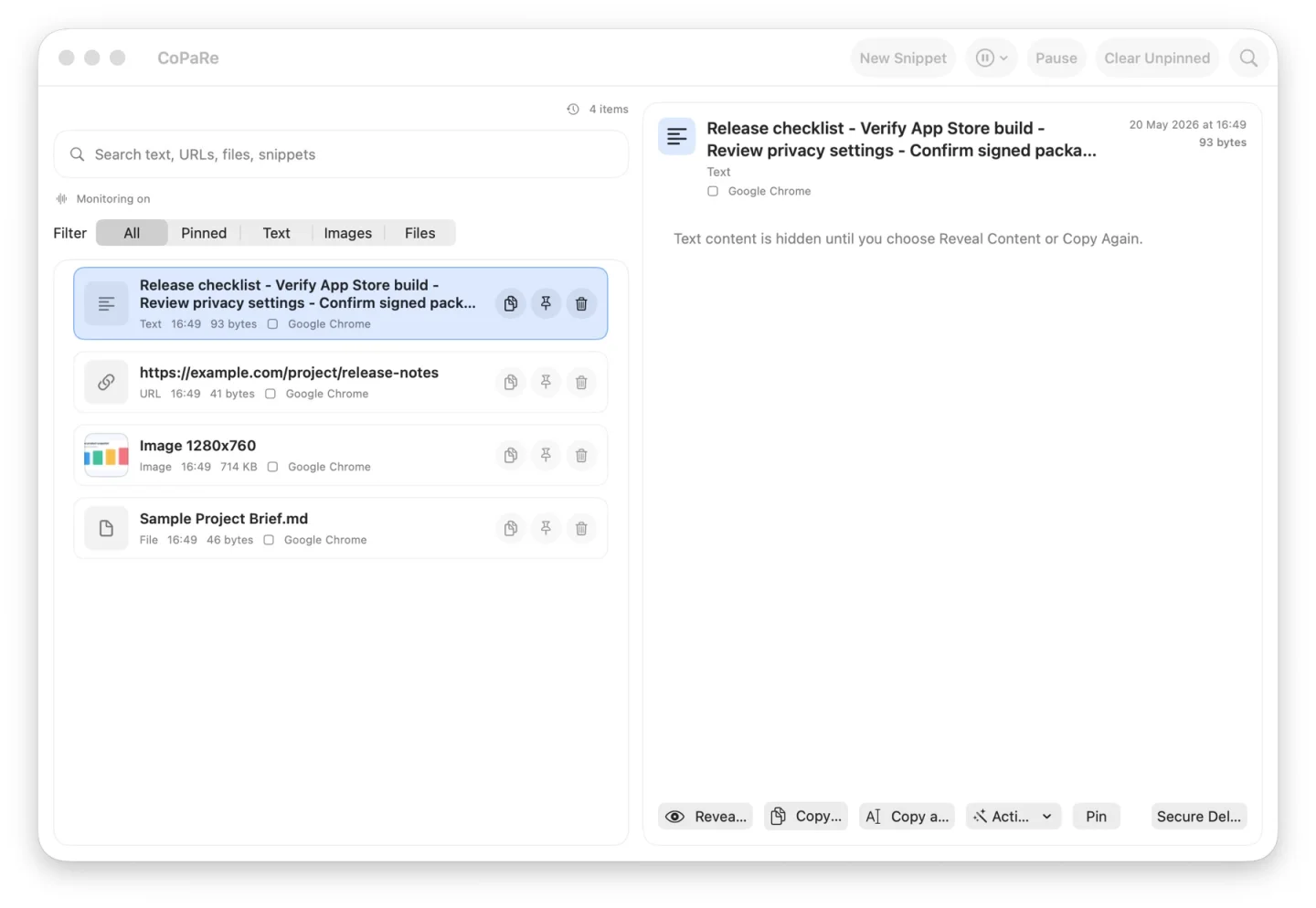
Copy text, links, images, and files as usual. CoPaRe keeps recent captures within reach from the menu bar.
CoPaRe keeps a session history on your Mac, with capture rules you control.
Open Quick Copy with ⌥⌘V. Search previews, titles, tags, or the source app.
Choose with the arrow keys. Return copies the item and brings you back to your previous app, ready to paste.
New in version 1.5
Six thoughtful additions for the things you copy every day. Processing stays on your Mac.
A compact picker for fast recall. Search, use the arrow keys, and press Return to copy. Escape takes you back.
One shortcut. Right where you left off.Save a copied text or link as a snippet. Edit its title, body, and tags, or duplicate it for a fresh variation.
For the words you keep coming back to.With unlock protection enabled, choose automatic locking when you leave the app, when your Mac sleeps, or after inactivity in CoPaRe.
Your privacy settings follow your routine.Set a delay for clearing content that CoPaRe places on the system clipboard. Anything you copy afterwards stays untouched.
A smaller window for sensitive copies.Create a password-protected backup of loaded snippets. Restore them on another Mac, with encryption and decryption handled locally.
Portable backups. A password you control.Reveal an image and choose Copy Text. Apple’s Vision framework recognizes the words on your Mac and copies them for your next step.
From screenshot to text, without an upload.These features are introduced in 1.5. App Store availability may follow the direct release while Apple reviews the update. Read the release notes
Designed to remember less
You choose what becomes a lasting snippet. Everyday clipboard captures stay in the current session.
Read the full privacy policyCaptured history stays in memory and is cleared when CoPaRe quits. Pinning a capture does not save it to disk.
Temporary by designReusable snippets can be kept in an encrypted local vault when persistence is enabled. Backups are created only when you choose.
Saved on your termsPause capture. Exclude apps. Set retention. Reveal content only when you need to.
No account to create. No clipboard cloud.A few things to know
Captured clipboard history is cleared, including pinned captures. Snippets you explicitly save can remain in the encrypted local vault if persistence is enabled. Quitting does not itself clear the macOS system clipboard; timed clipboard clearing is a separate setting.
Clipboard processing and image text recognition happen locally. There are no accounts, analytics, or cloud sync. If you choose Search on Web or Open URL, your browser connects to that website. The direct build can check GitHub for updates. See the privacy policy for details.
Load the snippets you want to move, then create an encrypted backup in Settings. Transfer that file yourself and restore it with the same password on your other Mac. CoPaRe cannot recover a forgotten backup password. Plain JSON export is also available and contains readable text.
Return copies the selected item and restores focus to your previous app. Paste normally with ⌘V. CoPaRe does not inject keystrokes and does not require Accessibility permission.
CoPaRe requires macOS 26.2 or later and supports both Apple silicon and Intel Macs. Choose the Mac App Store version for updates through Apple, or the signed and notarized direct build for updates through CoPaRe.
Make room for a better clipboard
Native to your Mac. Available your way.
macOS 26.2 or later · Apple silicon & Intel · Need a hand?